BlueMaple HXM Pitstop - Chart Of Accounts
By We Support on July 20, 2023
BeginnerChart Of Accounts
The Chart of Accounts is the blueprint of the accounts in your organization.
The overall structure of your Chart of Accounts is based on a system of double entry accounting that has become a standard all over the world to quantify how a company is doing financially.
To access the Chart of Accounts list, go to:
Home > Accounting > Accounting Masters > Chart of Accounts
1. How to Create/Edit Accounts
- Go to the Chart of Accounts list.Here you can open group accounts which contain other accounts. There are options to “Add Child” in an account, Edit or Delete the account.
- The option to create a child account will only appear if you click on a Group (folder) type Account.
- Enter a name for the account.
- Tick 'Is Group' if you want this to be a group account which can contain other accounts.
- Select the Account Type. Selecting this is important as some fields allow selecting only specific type of accounts.
- Change the currency if this account will be used for transactions with different currency. By default, it's the Company's currency.
- Click on Create New.
For examples
- Under the chart of accounts Go to current Liabilities and Add the Child "Account payable" as “Is Group” and under that add child > Creditors, Expense Payable and Payroll Payable.
- Similarly for the Credit card accounts add the child as “Amex card”
- Go to the Current assets ,Add the child “Bank accounts” as Is Group and under that add the Child “Chase account”.
- Under the Account receivable Add the Child Debtors.
- Go to the Indirect Expenses Add the child "Travel expenses" and mark its as “Is Group” and under the travel expenses add the child accounts as “Travel,Lodging,Fuel,Ticket Expenses.
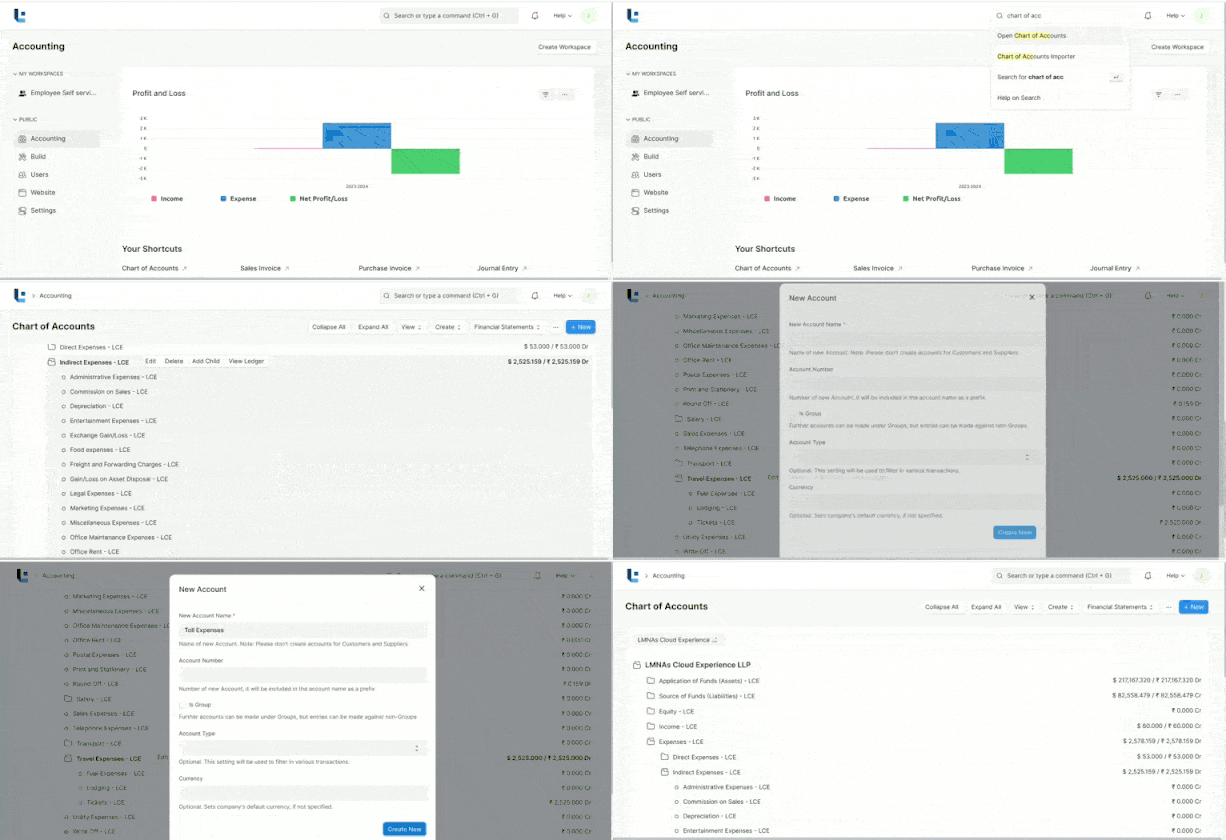
By this way we can add the navigate the accounts under the chart of accounts.
Was this article helpful?
No comments yet. Login to start a new discussion Start a new discussion