BlueMaple HXM Pitstop - Auto Repeat
By We Support on July 17, 2023
BeginnerAuto Repeat
Auto Repeat feature helps you create certain documents automatically in a given time period.
In Auto repeat ensure that the previous invoices are closed and for the future dates the invoice will be automatically generated on the monthly basis.
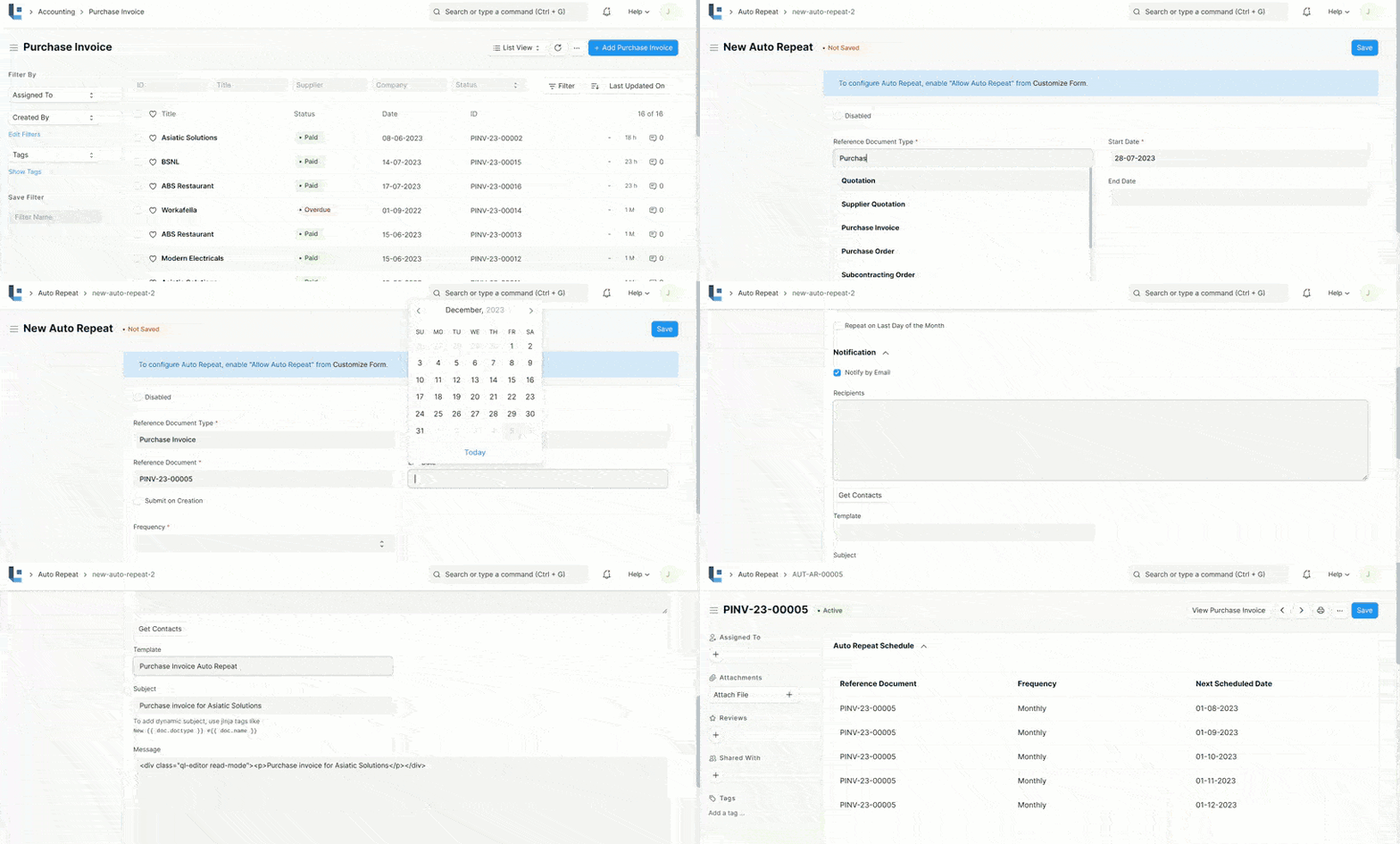
The following are the steps to enable the auto repeat option
- Once the purchase invoice is submitted the Auto repeat subscription is enabled.
- Click on the Auto repeat and Add new
- Enter the Reference Document Type (Purchase invoice) and Reference Document.(Enter the purchase invoice number )
- Enter the Start date and End date.
- Set the Frequency as (Daily, Weekly, Monthly, Quarterly, Half-yearly, Yearly).
- Enter the repeat on date (Whether it is first or last of every month).
- Click the Notification as”Notify by email” and enter the recipient mail id .
- We can choose the Email template and the Subject for the Email and finally click Save.
 Related Topics
Was this article helpful?
No comments yet. Login to start a new discussion Start a new discussion