BlueMaple HXM Pitstop - Item
By We Support on July 20, 2023
BeginnerItem
An Item is a product or a service offered by your company.
To access the Item list, go to:
Home > Stock > Items and Pricing > Item
or
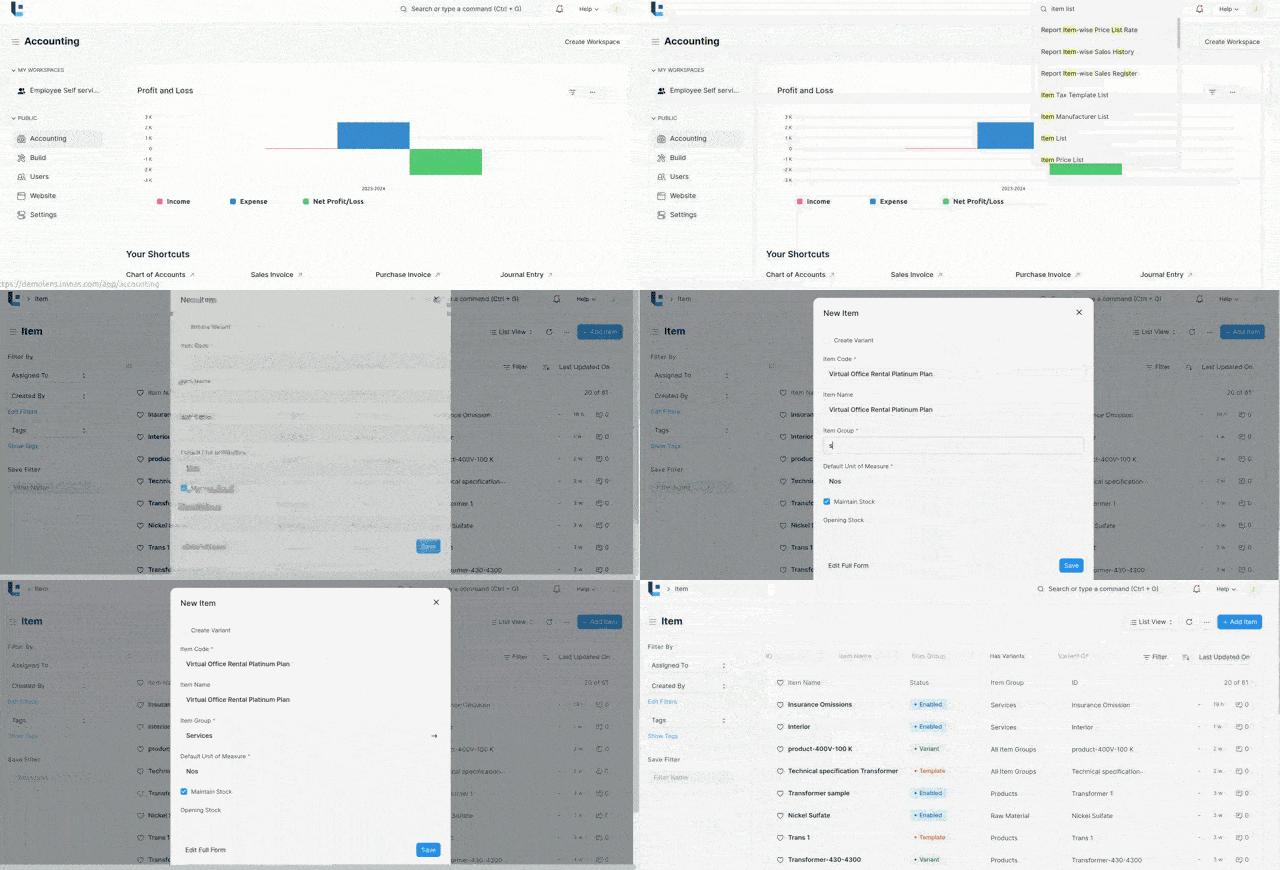
Type "Item List" on the search menu and Add New item.
1. Prerequisites
Before creating and using an Item, it is advised that you create the following first
2. How to create an Item
- Go to the Item list, click on new.
- Enter an Item Code, the Item name will be auto-filled the same as Item Code on clicking inside the Item Name field.
- Select an Item Group.
- Enter the Default Unit of Measure.
- Save
2.1 Item Properties
- Item Name: Item name is the actual name of your product or service.
- Item Code: Item Code is a short-form to denote your Item.
- Item Group: Item Group is used to categorize an Item under various criteria like products, raw materials, services or all Item groups.
- Default Unit of Measure: This is the default measuring unit that you will use for your product. It could be Nos, PC, Meters, etc.
2.2 Options when creating an item
- Disabled : If you disable an Item, it cannot be selected in any transaction
- Allow Alternative Item: Sometimes when manufacturing a finished good, specific material may not be available. If you tick this, you can create and select an alternative item from the Item Alternative list.
- Maintain Stock: If you are maintaining stock of this Item in your Inventory, the system will make a stock ledger entry for each transaction of this item. Ensure to keep this option unchecked when creating a non-stock Item (make to order/engineer) or a service.
- Include Item in Manufacturing: This is for raw material Items that'll be used to create finished goods.
- Valuation Rate: There are two options to maintain valuation of stock. FIFO (first in - first out) and Moving Average.
- Is Fixed Asset: Tick this checkbox if this item is a company Asset.
3.Features
3.1 Description
The text from the Item Code will be fetched by default. For Example if we give the Item name as "Virtual Office Rental Platinum Plan"the same will be displayed in the description.
4.Related Topics
Was this article helpful?
No comments yet. Login to start a new discussion Start a new discussion